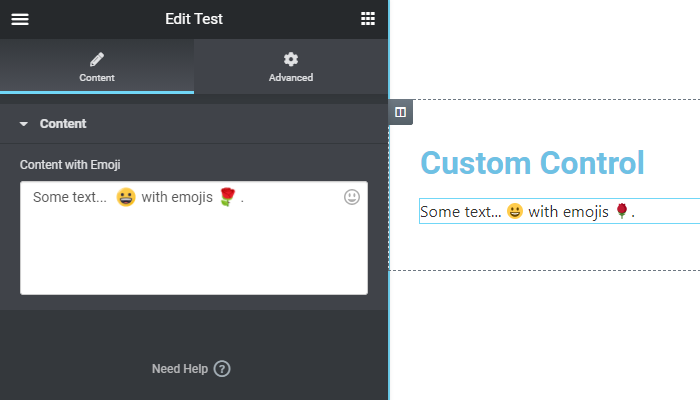
Appearance
Complex Example
Elementor Core AdvancedNow we'll build an addon that adds a new control to Elementor by using an external library. The control will display a textarea field, and we will use the Emoji One Area library to allow the user to add emojis to the content.
Folder Structure
The addon will have four files. The main file will register the control and the JS file. To test the control we will create a simple test widget.
elementor-emojionearea-control/
|
├─ assets/js/
|  └─ emojionearea.js
|
├─ controls/
|  └─ emojionearea.php
|
├─ widgets/
|  └─ test-widget.php
|
└─ elementor-emojionearea-control.phpPlugin Files
elementor-emojionearea-control.php
php
<?php
/**
 * Plugin Name: Elementor Emoji One Area Control
 * Description: Add emojis to the content using Elementor Emoji One Area control.
 * Plugin URI:  https://elementor.com/
 * Version:     1.0.0
 * Author:      Elementor Developer
 * Author URI:  https://developers.elementor.com/
 * Text Domain: elementor-emojionearea-control
 *
 * Requires Plugins: elementor
 * Elementor tested up to: 3.25.0
 * Elementor Pro tested up to: 3.25.0
 */

if ( ! defined( 'ABSPATH' ) ) {
	exit; // Exit if accessed directly.
}

/**
 * Register Emoji One Area Control.
 *
 * Include control file and register control class.
 *
 * @since 1.0.0
 * @param \Elementor\Controls_Manager $controls_manager Elementor controls manager.
 * @return void
 */
function register_emojionearea_control( $controls_manager ) {

	require_once( __DIR__ . '/controls/emojionearea.php' );

    $controls_manager->register( new \Elementor_EmojiOneArea_Control() );

}
add_action( 'elementor/controls/register', 'register_emojionearea_control' );

/**
 * Register Test Widget.
 *
 * Include widget file and register widget class.
 *
 * @since 1.0.0
 * @param \Elementor\Widgets_Manager $widgets_manager Elementor widgets manager.
 * @return void
 */
function register_test_widget( $widgets_manager ) {

	require_once( __DIR__ . '/widgets/test-widget.php' );

	$widgets_manager->register( new \Elementor_Test_Widget() );

}
add_action( 'elementor/widgets/register', 'register_test_widget' );controls/emojionearea.php
php
<?php
/**
 * Elementor emoji one area control.
 *
 * A control for displaying a textarea with the ability to add emojis.
 *
 * @since 1.0.0
 */
class Elementor_EmojiOneArea_Control extends \Elementor\Base_Data_Control {

	/**
	 * Get emoji one area control type.
	 *
	 * Retrieve the control type, in this case `emojionearea`.
	 *
	 * @since 1.0.0
	 * @access public
	 * @return string Control type.
	 */
	public function get_type(): string {
		return 'emojionearea';
	}

	/**
	 * Enqueue emoji one area control scripts and styles.
	 *
	 * Used to register and enqueue custom scripts and styles used by the emoji one
	 * area control.
	 *
	 * @since 1.0.0
	 * @access public
	 */
	public function enqueue(): void {
		// Styles
		wp_register_style( 'emojionearea', 'https://cdnjs.cloudflare.com/ajax/libs/emojionearea/3.4.2/emojionearea.css', [], '3.4.2' );
		wp_enqueue_style( 'emojionearea' );

		// Scripts
		wp_register_script( 'emojionearea', 'https://cdnjs.cloudflare.com/ajax/libs/emojionearea/3.4.2/emojionearea.js', [], '3.4.2' );
		wp_register_script( 'emojionearea-control', plugins_url( '/assets/js/emojionearea.js', dirname( __FILE__ ) ), [ 'emojionearea' ], '1.0.0' );
		wp_enqueue_script( 'emojionearea-control' );
	}

	/**
	 * Get emoji one area control default settings.
	 *
	 * Retrieve the default settings of the emoji one area control. Used to return
	 * the default settings while initializing the emoji one area control.
	 *
	 * @since 1.0.0
	 * @access protected
	 * @return array Control default settings.
	 */
	protected function get_default_settings(): array {
		return [
			'label_block' => true,
			'rows' => 3,
			'emojionearea_options' => [],
		];
	}

	/**
	 * Render emoji one area control output in the editor.
	 *
	 * Used to generate the control HTML in the editor using Underscore JS
	 * template. The variables for the class are available using `data` JS
	 * object.
	 *
	 * @since 1.0.0
	 * @access public
	 */
	public function content_template(): void {
		$control_uid = $this->get_control_uid();
		?>
		<div class="elementor-control-field">

			<# if ( data.label ) {#>
			<label for="<?php echo esc_attr( $control_uid ); ?>" class="elementor-control-title">{{{ data.label }}}</label>
			<# } #>

			<div class="elementor-control-input-wrapper">
				<textarea id="<?php echo esc_attr( $control_uid ); ?>" class="elementor-control-tag-area" rows="{{ data.rows }}" data-setting="{{ data.name }}" placeholder="{{ data.placeholder }}"></textarea>
			</div>

		</div>

		<# if ( data.description ) { #>
		<div class="elementor-control-field-description">{{{ data.description }}}</div>
		<# } #>
		<?php
	}

}assets/js/emojionearea.js
js
window.addEventListener( 'elementor/init', () => {

	const emojioneareaItemView = elementor.modules.controls.BaseData.extend({
		onReady() {
			const self = this,
				options = _.extend({
					events: {
						change: () => self.saveValue(),
						emojibtn_click: () => self.saveValue(),
						keyup: () => self.saveValue()
					},
					pickerPosition: 'bottom',
					filtersPosition: 'top',
					searchPosition: 'bottom',
					saveEmojisAs: 'unicode',
					inline: false,
				}, this.model.get( 'emojionearea_options' ) );

			this.ui.textarea.emojioneArea( options );
		},
		saveValue() {
			this.setValue(this.ui.textarea[0].emojioneArea.getText());
		},
		onBeforeDestroy() {
			this.saveValue();
			this.ui.textarea[0].emojioneArea.off();
		}
	});

	elementor.addControlView( 'emojionearea', emojioneareaItemView );

} );widgets/test-widget.php
php
<?php
if ( ! defined( 'ABSPATH' ) ) {
	exit; // Exit if accessed directly.
}

/**
 * Elementor Test Widget.
 *
 * Elementor widget that uses the emojionearea control.
 *
 * @since 1.0.0
 */
class Elementor_Test_Widget extends \Elementor\Widget_Base {

	/**
	 * Get widget name.
	 *
	 * Retrieve test widget name.
	 *
	 * @since 1.0.0
	 * @access public
	 * @return string Widget name.
	 */
	public function get_name(): string {
		return 'test';
	}

	/**
	 * Get widget title.
	 *
	 * Retrieve test widget title.
	 *
	 * @since 1.0.0
	 * @access public
	 * @return string Widget title.
	 */
	public function get_title(): string {
		return esc_html__( 'Test', 'elementor-emojionearea-control' );
	}

	/**
	 * Get widget icon.
	 *
	 * Retrieve test widget icon.
	 *
	 * @since 1.0.0
	 * @access public
	 * @return string Widget icon.
	 */
	public function get_icon(): string {
		return 'eicon-code';
	}

	/**
	 * Get widget categories.
	 *
	 * Retrieve the list of categories the test widget belongs to.
	 *
	 * @since 1.0.0
	 * @access public
	 * @return array Widget categories.
	 */
	public function get_categories(): array {
		return [ 'general' ];
	}

	/**
	 * Get widget keywords.
	 *
	 * Retrieve the list of keywords the test widget belongs to.
	 *
	 * @since 1.0.0
	 * @access public
	 * @return array Widget keywords.
	 */
	public function get_keywords(): array {
		return [ 'test', 'emoji' ];
	}

	/**
	 * Get custom help URL.
	 *
	 * Retrieve a URL where the user can get more information about the widget.
	 *
	 * @since 1.0.0
	 * @access public
	 * @return string Widget help URL.
	 */
	public function get_custom_help_url(): string {
		return 'https://developers.elementor.com/docs/widgets/';
	}

	/**
	 * Whether the widget requires inner wrapper.
	 *
	 * Determine whether to optimize the DOM size.
	 *
	 * @since 1.0.0
	 * @access public
	 * @return bool Whether to optimize the DOM size.
	 */
	public function has_widget_inner_wrapper(): bool {
		return false;
	}

	/**
	 * Whether the element returns dynamic content.
	 *
	 * Determine whether to cache the element output or not.
	 *
	 * @since 1.0.0
	 * @access protected
	 * @return bool Whether to cache the element output.
	 */
	protected function is_dynamic_content(): bool {
		return false;
	}

	/**
	 * Register test widget controls.
	 *
	 * Add input fields to allow the user to customize the widget settings.
	 *
	 * @since 1.0.0
	 * @access protected
	 */
	protected function register_controls(): void {

		$this->start_controls_section(
			'content_section',
			[
				'label' => esc_html__( 'Content', 'elementor-emojionearea-control' ),
				'tab' => \Elementor\Controls_Manager::TAB_CONTENT,
			]
		);

		$this->add_control(
			'content',
			[
				'label' => esc_html__( 'Content with Emoji', 'elementor-emojionearea-control' ),
				'type' => 'emojionearea',

			]
		);

		$this->end_controls_section();

	}

	/**
	 * Render test widget output on the frontend.
	 *
	 * Written in PHP and used to generate the final HTML.
	 *
	 * @since 1.0.0
	 * @access protected
	 */
	protected function render(): void {
		$settings = $this->get_settings_for_display();

		if ( empty( $settings['content'] ) ) {
			return;
		}

		echo $settings['content'];
	}

}The Result
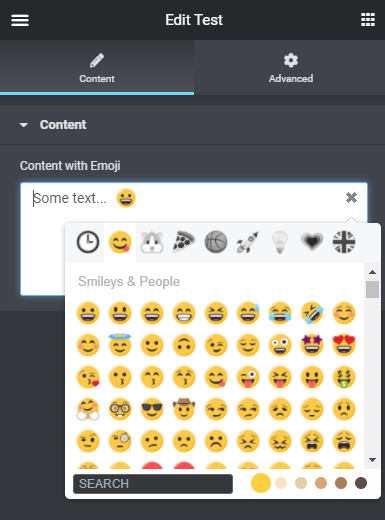
The emojis control as it appears in a widget:
The control content as displayed in Elementor preview: