
Appearance
Dynamic Tags Groups
Elementor Core Advanced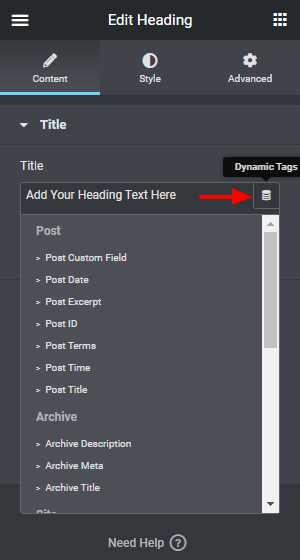
To simplify navigation, all tags are arranged into groups. This allows users to quickly scan the list and scroll to the group that suits them.
Available Groups
Elementor core registers one built-in group:
| Slug | Label |
|---|---|
base | Base Tags |
Elementor Pro registers additional groups:
| Slug | Label |
|---|---|
post | Post |
archive | Archive |
site | Site |
media | Media |
action | Actions |
author | Author |
comments | Comments |
If you would like to use the groups added by Elementor Pro, your addons must make sure Elementor Pro was loaded.
Groups vs. Categories
Groups control where a tag appears in the dynamic tags panel list (the visual grouping users see). Categories are a separate concept: they control which controls a tag can appear on (for example, text, url, image, color). A tag declares its categories in get_categories() and its display group in get_group().
Applying Groups
When creating new dynamic tags, you can set the tag group by returning group names with the get_group() method:
php
class Elementor_Test_Tag extends \Elementor\Core\DynamicTags\Tag {

	public function get_group(): array {
		return [ 'action' ];
	}

}Creating New Groups
External developers can create custom groups using the elementor/dynamic_tags/register action hook, which passes the dynamic tags manager as a parameter:
php
/**
 * Register new dynamic tag group
 *
 * @since 1.0.0
 * @param \Elementor\Core\DynamicTags\Manager $dynamic_tags_manager Elementor dynamic tags manager.
 * @return void
 */
function register_new_dynamic_tag_group( $dynamic_tags_manager ) {

	$dynamic_tags_manager->register_group(
		'group-name',
		[
			'title' => esc_html__( 'Group Label', 'textdomain' )
		]
	);

}
add_action( 'elementor/dynamic_tags/register', 'register_new_dynamic_tag_group' );