
Appearance
Elementor Tabs
Elementor Core Basic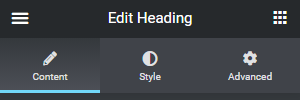
In some panels, Elementor uses tab navigation to display controls. When extending Elementor, you can use any tab you need, or create new ones.
Built-in Tabs
Elementor has 6 pre-defined tabs used in different panels:
| Name/ID | Label | Constant |
|---|---|---|
content | Content | \Elementor\Controls_Manager::TAB_CONTENT |
style | Style | \Elementor\Controls_Manager::TAB_STYLE |
advanced | Advanced | \Elementor\Controls_Manager::TAB_ADVANCED |
responsive | Responsive | \Elementor\Controls_Manager::TAB_RESPONSIVE |
layout | Layout | \Elementor\Controls_Manager::TAB_LAYOUT |
settings | Settings | \Elementor\Controls_Manager::TAB_SETTINGS |
The tabs are set in the \Elementor\Controls_Manager class. They are defined as constants and registered using the init_tabs() method; each constant contains the tab name and label.
Usage Examples
The widgets panel, for example, displays controls in a Content tab, allowing the user to set the widget content, and a Style tab to design the content. In addition, Elementor adds an Advanced tab to all widgets.
The page settings panel, on the other hand, displays controls in the Settings tab, the Style tab, the Layout tab, among others – depending on the settings.
Using Tabs
When we add a new control to the element panel, we use the inherited add_control() method. Before adding a new control, we need to create a new section using the start_controls_section() method. We use this method to define the tab:
php
$this->start_controls_section(
	'style_section',
	[
		'label' => esc_html__( 'Style Section', 'textdomain' ),
		'tab' => \Elementor\Controls_Manager::TAB_STYLE,
	]
);Add New Tabs
To create custom tabs, use the add_tab() method:
php
function add_panel_tab() {
	\Elementor\Controls_Manager::add_tab(
		'new-tab',
		esc_html__( 'New Tab', 'textdomain' )
	);
}
add_action( 'elementor/init', 'add_panel_tab' );To add a custom icon above the tab label, you will need to add custom CSS:
css
.elementor-panel .elementor-tab-control-new-tab a:before,
.elementor-panel .elementor-tab-control-new-tab span:before {
	font-family: eicons;
	content: '\e942';
}Best Practices
Official Guidelines
The official Elementor guidelines strongly recommend using one of the default tabs.
Nevertheless, this feature is documented as some addon authors use code workarounds that slow down the editor and, in some edge cases, break it.