Appearance
Advanced Example
Elementor Pro AdvancedFor a more advanced example we are going to create an addon with a credit card field.
Folder Structure
The addon will have two files. One file for the new field-type and a main file to register the new field and handle all the other stuff.
elementor-form-credit-card-number-field/
|
├─ form-fields/
|  └─ credit-card-number.php
|
└─ elementor-form-credit-card-number-field.phpPlugin Files
elementor-form-credit-card-number-field.php
php
<?php
/**
 * Plugin Name: Elementor Forms Credit Card Number Field
 * Description: Custom addon that adds a "credit-card" field to Elementor Forms Widget.
 * Plugin URI:  https://elementor.com/
 * Version:     1.0.0
 * Author:      Elementor Developer
 * Author URI:  https://developers.elementor.com/
 * Text Domain: elementor-form-credit-card-number-field
 *
 * Requires Plugins: elementor
 * Elementor tested up to: 3.25.0
 * Elementor Pro tested up to: 3.25.0
 */

if ( ! defined( 'ABSPATH' ) ) {
	exit; // Exit if accessed directly.
}

/**
 * Register `credit-card-number` field-type to Elementor form widget.
 *
 * @since 1.0.0
 * @param \ElementorPro\Modules\Forms\Registrars\Form_Fields_Registrar $form_fields_registrar
 * @return void
 */
function add_new_credit_card_number_field( $form_fields_registrar ) {

	require_once( __DIR__ . '/form-fields/credit-card-number.php' );

	$form_fields_registrar->register( new \Elementor_Credit_Card_Number_Field() );

}
add_action( 'elementor_pro/forms/fields/register', 'add_new_credit_card_number_field' );form-fields/credit-card-number.php
php
<?php
if ( ! defined( 'ABSPATH' ) ) {
	exit; // Exit if accessed directly.
}

/**
 * Elementor Form Field - Credit Card Number
 *
 * Add a new "Credit Card Number" field to Elementor form widget.
 *
 * @since 1.0.0
 */
class Elementor_Credit_Card_Number_Field extends \ElementorPro\Modules\Forms\Fields\Field_Base {

	/**
	 * Get field type.
	 *
	 * Retrieve credit card number field unique ID.
	 *
	 * @since 1.0.0
	 * @access public
	 * @return string Field type.
	 */
	public function get_type(): string {
		return 'credit-card-number';
	}

	/**
	 * Get field name.
	 *
	 * Retrieve credit card number field label.
	 *
	 * @since 1.0.0
	 * @access public
	 * @return string Field name.
	 */
	public function get_name(): string {
		return esc_html__( 'Credit Card Number', 'elementor-form-credit-card-number-field' );
	}

	/**
	 * Render field output on the frontend.
	 *
	 * Written in PHP and used to generate the final HTML.
	 *
	 * @since 1.0.0
	 * @access public
	 * @param mixed $item
	 * @param mixed $item_index
	 * @param mixed $form
	 * @return void
	 */
	public function render( $item, $item_index, $form ): void {
		$form_id = $form->get_id();

		$form->add_render_attribute(
			'input' . $item_index,
			[
				'class' => 'elementor-field-textual',
				'for' => $form_id . $item_index,
				'type' => 'tel',
				'inputmode' => 'numeric',
				'maxlength' => '19',
				'pattern' => '[0-9]{4}\s[0-9]{4}\s[0-9]{4}\s[0-9]{4}',
				'placeholder' => $item['credit-card-placeholder'],
				'autocomplete' => 'cc-number',
			]
		);

		echo '<input ' . $form->get_render_attribute_string( 'input' . $item_index ) . '>';
	}

	/**
	 * Field validation.
	 *
	 * Validate credit card number field value to ensure it complies to certain rules.
	 *
	 * @since 1.0.0
	 * @access public
	 * @param \ElementorPro\Modules\Forms\Classes\Field_Base   $field
	 * @param \ElementorPro\Modules\Forms\Classes\Form_Record  $record
	 * @param \ElementorPro\Modules\Forms\Classes\Ajax_Handler $ajax_handler
	 * @return void
	 */
	public function validation( $field, $record, $ajax_handler ): void {
		if ( empty( $field['value'] ) ) {
			return;
		}

		if ( preg_match( '/^[0-9]{4}\s[0-9]{4}\s[0-9]{4}\s[0-9]{4}$/', $field['value'] ) !== 1 ) {
			$ajax_handler->add_error(
				$field['id'],
				esc_html__( 'Credit card number must be in "XXXX XXXX XXXX XXXX" format.', 'elementor-form-credit-card-number-field' )
			);
		}
	}

	/**
	 * Update form widget controls.
	 *
	 * Add input fields to allow the user to customize the credit card number field.
	 *
	 * @since 1.0.0
	 * @access public
	 * @param \Elementor\Widget_Base $widget The form widget instance.
	 * @return void
	 */
	public function update_controls( $widget ): void {
		$elementor = \ElementorPro\Plugin::elementor();

		$control_data = $elementor->controls_manager->get_control_from_stack( $widget->get_unique_name(), 'form_fields' );

		if ( is_wp_error( $control_data ) ) {
			return;
		}

		$field_controls = [
			'credit-card-placeholder' => [
				'name' => 'credit-card-placeholder',
				'label' => esc_html__( 'Card Placeholder', 'elementor-form-credit-card-number-field' ),
				'type' => \Elementor\Controls_Manager::TEXT,
				'default' => 'xxxx xxxx xxxx xxxx',
				'dynamic' => [
					'active' => true,
				],
				'condition' => [
					'field_type' => $this->get_type(),
				],
				'tab'          => 'content',
				'inner_tab'    => 'form_fields_content_tab',
				'tabs_wrapper' => 'form_fields_tabs',
			],
		];

		$control_data['fields'] = $this->inject_field_controls( $control_data['fields'], $field_controls );

		$widget->update_control( 'form_fields', $control_data );
	}

	/**
	 * Field constructor.
	 *
	 * Used to add a script to the Elementor editor preview.
	 *
	 * @since 1.0.0
	 * @access public
	 * @return void
	 */
	public function __construct() {
		parent::__construct();
		add_action( 'elementor/preview/init', [ $this, 'editor_preview_footer' ] );
	}

	/**
	 * Elementor editor preview.
	 *
	 * Add a script to the footer of the editor preview screen.
	 *
	 * @since 1.0.0
	 * @access public
	 * @return void
	 */
	public function editor_preview_footer(): void {
		add_action( 'wp_footer', [ $this, 'content_template_script' ] );
	}

	/**
	 * Content template script.
	 *
	 * Add content template alternative, to display the field in Elementor editor.
	 *
	 * @since 1.0.0
	 * @access public
	 * @return void
	 */
	public function content_template_script(): void {
		?>
		<script>
		jQuery( document ).ready( () => {

			elementor.hooks.addFilter(
				'elementor_pro/forms/content_template/field/<?php echo $this->get_type(); ?>',
				function ( inputField, item, i ) {
					const fieldType    = 'tel';
					const fieldId      = `form_field_${i}`;
					const fieldClass   = `elementor-field-textual elementor-field ${item.css_classes}`;
					const inputmode    = 'numeric';
					const maxlength    = '19';
					const pattern      = '[0-9\s]{19}';
					const placeholder  = item['credit-card-placeholder'];
					const autocomplete = 'cc-number';

					return `<input type="${fieldType}" id="${fieldId}" class="${fieldClass}" inputmode="${inputmode}" maxlength="${maxlength}" pattern="${pattern}" placeholder="${placeholder}" autocomplete="${autocomplete}">`;
				}, 10, 3
			);

		});
		</script>
		<?php
	}

}The Result
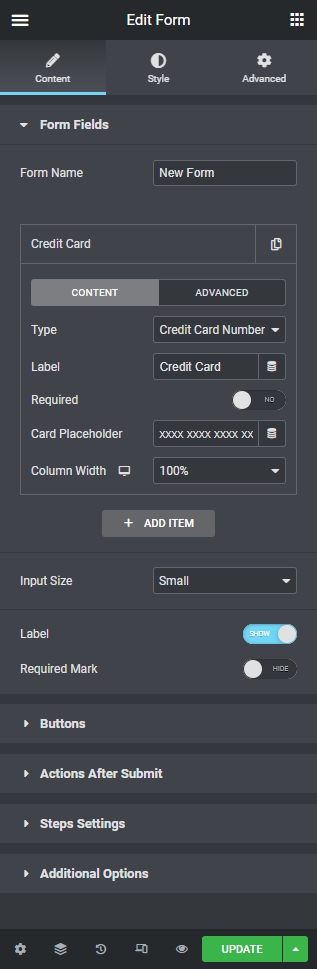
The new "Credit Card Number" field inside the Elementor form widget: