
Appearance
Elementor Forms
DANGER
This page will be deleted once all the content will be moved to individual pages inside Elementor Hooks.
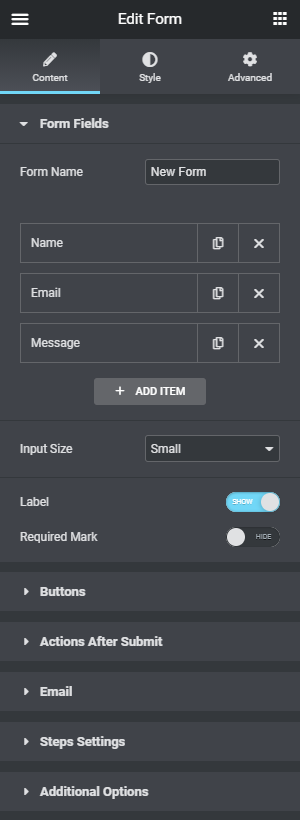
Elementor Form Builder is an advanced Elementor Widget that allows users to create forms with the ultimate drag and drop visual form builder.
Overview
Forms API is a set of specific functionality that allows developers to extend Elementor Form functionality.
External developers can extend the form Widget functionality to match their needs. For example, validate data in a new way, integrate with new marketing automation tools and CRM services, change the collected data before saving it or sending it, and much more.
Form Hooks
Elementor Pro adds new features to the core Elementor. The Forms API allows developers to filter content, validate data, alter webhooks, execute custom code and much more.
Form Validation
elementor_pro/forms/validation
After the forms module is loaded and it’s a POST request with the form action. This is the place to add a form validation handlers.
Arguments
| Argument | Type | Description |
|---|---|---|
record | Form_Record | The record submitted. |
ajax_handler | Ajax_Handler | The Ajax Handler component. |
Example
php
// Validate the Ticket ID field is in XXX-XXXX format.
add_action( 'elementor_pro/forms/validation', function ( $record, $ajax_handler ) {
	$fields = $record->get_field( [
		'id' => 'ticket_id',
	] );

	if ( empty( $fields ) ) {
		return;
	}

	$field = current( $fields );

	if ( 1 !== preg_match( '/^\w{3}-\w{4}$/', $field['value'] ) ) {
		$ajax_handler->add_error( $field['id'], 'Invalid Ticket ID, it must be in the format XXX-XXXX' );
	}
}, 10, 2 );elementor_pro/forms/validation/{$field_type}
After the forms module is loaded and it’s a POST request with the form action. This allows developers to validate individual field types.
The dynamic portion of the hook name, $field_type, refers to the field type.
Arguments
| Argument | Type | Description |
|---|---|---|
field | Array | The submitted field. |
record | Form_Record | The record submitted. |
ajax_handler | Ajax_Handler | The Ajax Handler component. |
Example
php
// Validate the Tel field is in XXX-XXX-XXXX format.
add_action( 'elementor_pro/forms/validation/tel', function( $field, $record, $ajax_handler ) {

	// Match this format XXX-XXX-XXXX, 123-456-7890

	if ( preg_match( '/[0-9]{3}-[0-9]{3}-[0-9]{4}/', $field['value'] ) !== 1 ) {
		$ajax_handler->add_error( $field['id'], 'Please make sure the phone number is in XXX-XXX-XXXX format, eg: 123-456-7890' );
	}
}, 10, 3 );Form Processing
elementor_pro/forms/process
Fires after the forms fields have been validated and processed. This is the place to add a extra form field processing work handlers.
Arguments
| Argument | Type | Description |
|---|---|---|
record | Form_Record | The record submitted. |
ajax_handler | Ajax_Handler | The Ajax Handler component. |
elementor_pro/forms/process/{$field_type}
After the forms fields have been validated, Fires when a single form field is being processed. This allows developers to process individual field types.
The dynamic portion of the hook name, $field_type, refers to the field type.
Arguments
| Argument | Type | Description |
|---|---|---|
field | Array | The submitted field. |
record | Form_Record | The record submitted. |
ajax_handler | Ajax_Handler | The Ajax Handler component. |
Form Submission
elementor_pro/forms/form_submitted
After the forms module is loaded and it’s a POST request with the form action. This is the place to add a form handlers.
Arguments
| Argument | Type | Description |
|---|---|---|
module | ElementorPro\Modules\Forms | The entire Elementor HTML output of current page/post. |
Example
php
add_action( 'elementor_pro/forms/form_submitted', function( $module ) {
	$module->add_component( 'uploads_handler', new Uploads_Handler() );
} );Form New Record
elementor_pro/forms/new_record
After the form actions have run. This is the place to add custom form handlers.
Arguments
| Argument | Type | Description |
|---|---|---|
record | Form_Record | The record submitted. |
ajax_handler | Ajax_Handler | The Ajax Handler component. |
Example
php
function send_custom_webhook( $record, $handler ) {

	$form_name = $record->get_form_settings( 'form_name' );

	// Replace MY_FORM_NAME with the name you gave your form
	if ( 'MY_FORM_NAME' !== $form_name ) {
		return;
	}

	$raw_fields = $record->get( 'fields' );
	$fields = [];
	foreach ( $raw_fields as $id => $field ) {
		$fields[ $id ] = $field['value'];
	}

	wp_remote_post(
		'https://api.example.com/',
		[
			'body' => $fields,
		]
	);
}
add_action( 'elementor_pro/forms/new_record', 'send_custom_webhook', 10, 2 );Form Webhooks Response
elementor_pro/forms/webhooks/response
Handle the webhook response.
Arguments
| Argument | Type | Description |
|---|---|---|
response | array/WP_Error | The wp_remote_post response. See wp_remote_retrieve_response_message() function for more information |
record | Form_Record | The record submitted. |
Form Mail Headers Filter
elementor_pro/forms/wp_mail_headers
Arguments
| Argument | Type | Description |
|---|---|---|
headers | string | The email headers for wp_mail arguments. |
Form Mail Message Filter
elementor_pro/forms/wp_mail_message
Arguments
| Argument | Type | Description |
|---|---|---|
email_text | string | The email html content for wp_mail arguments. |
Action After Email Sent Successfully
elementor_pro/forms/mail_sent
Arguments
| Argument | Type | Description |
|---|---|---|
settings | array | The form settings. |
record | Form_Record | The record submitted. |