Appearance
Advanced Example
Elementor Pro AdvancedFor a more advanced example we are going to create an addon which will add a new subscriber to a Sendy server using its API.
Folder Structure
The addon will have two files. One file for the new form action and a main file to register the action and handle all the other stuff.
elementor-forms-sendy-action/
|
├─ form-actions/
|  └─ sendy.php
|
└─ elementor-forms-sendy-action.phpPlugin Files
elementor-forms-sendy-action.php
php
<?php
/**
 * Plugin Name: Elementor Forms Sendy Action
 * Description: Custom addon which adds new subscriber to Sendy after form submission.
 * Plugin URI:  https://elementor.com/
 * Version:     1.0.0
 * Author:      Elementor Developer
 * Author URI:  https://developers.elementor.com/
 * Text Domain: elementor-forms-sendy-action
 *
 * Requires Plugins: elementor
 * Elementor tested up to: 3.25.0
 * Elementor Pro tested up to: 3.25.0
 */

if ( ! defined( 'ABSPATH' ) ) {
	exit; // Exit if accessed directly.
}

/**
 * Add new subscriber to Sendy.
 *
 * @since 1.0.0
 * @param ElementorPro\Modules\Forms\Registrars\Form_Actions_Registrar $form_actions_registrar
 * @return void
 */
function add_new_sendy_form_action( $form_actions_registrar ) {

	include_once( __DIR__ .  '/form-actions/sendy.php' );

	$form_actions_registrar->register( new Sendy_Action_After_Submit() );

}
add_action( 'elementor_pro/forms/actions/register', 'add_new_sendy_form_action' );form-actions/sendy.php
php
<?php
if ( ! defined( 'ABSPATH' ) ) {
	exit; // Exit if accessed directly.
}

/**
 * Elementor form Sendy action.
 *
 * Custom Elementor form action which adds new subscriber to Sendy after form submission.
 *
 * @since 1.0.0
 */
class Sendy_Action_After_Submit extends \ElementorPro\Modules\Forms\Classes\Action_Base {

	/**
	 * Get action name.
	 *
	 * Retrieve Sendy action name.
	 *
	 * @since 1.0.0
	 * @access public
	 * @return string
	 */
	public function get_name(): string {
		return 'sendy';
	}

	/**
	 * Get action label.
	 *
	 * Retrieve Sendy action label.
	 *
	 * @since 1.0.0
	 * @access public
	 * @return string
	 */
	public function get_label(): string {
		return esc_html__( 'Sendy', 'elementor-forms-sendy-action' );
	}

	/**
	 * Register action controls.
	 *
	 * Add input fields to allow the user to customize the action settings.
	 *
	 * @since 1.0.0
	 * @access public
	 * @param \Elementor\Widget_Base $widget
	 */
	public function register_settings_section( $widget ): void {

		$widget->start_controls_section(
			'section_sendy',
			[
				'label' => esc_html__( 'Sendy', 'elementor-forms-sendy-action' ),
				'condition' => [
					'submit_actions' => $this->get_name(),
				],
			]
		);

		$widget->add_control(
			'sendy_url',
			[
				'label' => esc_html__( 'Sendy URL', 'elementor-forms-sendy-action' ),
				'type' => \Elementor\Controls_Manager::TEXT,
				'placeholder' => 'https://your_sendy_installation/',
				'description' => esc_html__( 'Enter the URL where you have Sendy installed.', 'elementor-forms-sendy-action' ),
			]
		);

		$widget->add_control(
			'sendy_list',
			[
				'label' => esc_html__( 'Sendy List ID', 'elementor-forms-sendy-action' ),
				'type' => \Elementor\Controls_Manager::TEXT,
				'description' => esc_html__( 'The list ID you want to subscribe a user to. This encrypted & hashed ID can be found under "View all lists" section.', 'elementor-forms-sendy-action' ),
			]
		);

		$widget->add_control(
			'sendy_email_field',
			[
				'label' => esc_html__( 'Email Field ID', 'elementor-forms-sendy-action' ),
				'type' => \Elementor\Controls_Manager::TEXT,
			]
		);

		$widget->add_control(
			'sendy_name_field',
			[
				'label' => esc_html__( 'Name Field ID', 'elementor-forms-sendy-action' ),
				'type' => \Elementor\Controls_Manager::TEXT,
			]
		);

		$widget->end_controls_section();

	}

	/**
	 * Run action.
	 *
	 * Runs the Sendy action after form submission.
	 *
	 * @since 1.0.0
	 * @access public
	 * @param \ElementorPro\Modules\Forms\Classes\Form_Record  $record
	 * @param \ElementorPro\Modules\Forms\Classes\Ajax_Handler $ajax_handler
	 */
	public function run( $record, $ajax_handler ): void {

		$settings = $record->get( 'form_settings' );

		//  Make sure that there is a Sendy installation URL.
		if ( empty( $settings['sendy_url'] ) ) {
			return;
		}

		//  Make sure that there is a Sendy list ID.
		if ( empty( $settings['sendy_list'] ) ) {
			return;
		}

		// Make sure that there is a Sendy email field ID (required by Sendy to subscribe users).
		if ( empty( $settings['sendy_email_field'] ) ) {
			return;
		}

		// Get submitted form data.
		$raw_fields = $record->get( 'fields' );

		// Normalize form data.
		$fields = [];
		foreach ( $raw_fields as $id => $field ) {
			$fields[ $id ] = $field['value'];
		}

		// Make sure the user entered an email (required by Sendy to subscribe users).
		if ( empty( $fields[ $settings['sendy_email_field'] ] ) ) {
			return;
		}

		// Request data based on the param list at https://sendy.co/api
		$sendy_data = [
			'email' => $fields[ $settings['sendy_email_field'] ],
			'list' => $settings['sendy_list'],
			'ipaddress' => \ElementorPro\Core\Utils::get_client_ip(),
			'referrer' => isset( $_POST['referrer'] ) ? $_POST['referrer'] : '',
		];

		// Add name if field is mapped.
		if ( empty( $fields[ $settings['sendy_name_field'] ] ) ) {
			$sendy_data['name'] = $fields[ $settings['sendy_name_field'] ];
		}

		// Send the request.
		wp_remote_post(
			$settings['sendy_url'] . 'subscribe',
			[
				'body' => $sendy_data,
			]
		);

	}

	/**
	 * On export.
	 *
	 * Clears Sendy form settings/fields when exporting.
	 *
	 * @since 1.0.0
	 * @access public
	 * @param array $element
	 */
	public function on_export( $element ): array {

		unset(
			$element['sendy_url'],
			$element['sendy_list'],
			$element['sendy_email_field'],
			$element['sendy_name_field']
		);

		return $element;

	}

}The Result
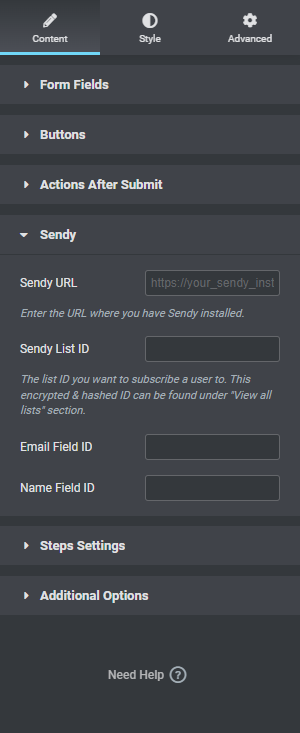
The new "Sendy" action controls inside the Elementor form widget: