
Appearance
Rendering Inline Editing
Elementor Core IntermediateWhen developing widgets, developers can define which controls will be inline editable in both the editor panel and preview area.
Inline Editing Toolbars
Elementor supports the following types of toolbars for inline editing:
- No Toolbar –
(none)Inline text editing without a toolbar, just typing text inline. - Basic Toolbar –
(basic)Inline text editing with a minimal toolbar, including: bold, italic and underline buttons. - Advanced Toolbar –
(advanced)Inline text editing with a full toolbar, including: adding/removing links, H1-H6 heading, blockquote, preformatting and bulleted or numbered list buttons.
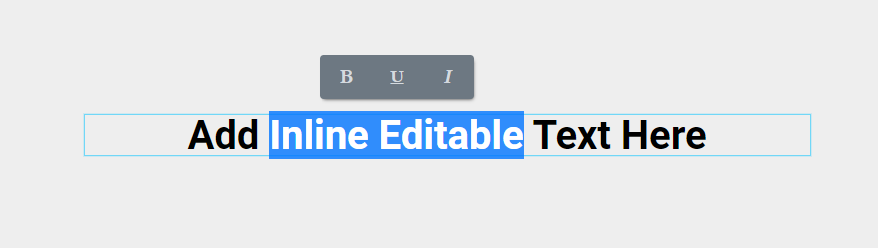
Elementor recommends using inline editing as follows:
- Input controls – use inline editing without any toolbars in simple text/number/url/email fields.
- Textarea controls – use inline editing with a minimal toolbar.
- Wysiwyg controls – use inline editing with a full toolbar.
Adding Inline Editing
Inline editing support is added using the add_inline_editing_attributes() method inside your widget render() and the addInlineEditingAttributes() method in content_template().
Each inline editing attribute has two parameters:
- Key
(string)– Unique name used in the code. - Toolbar
(string)– Toolbar type. Accepted values are:advanced,basicornone. Default isnone.
Use the following to add new inline editing attributes:
php
<?php
class Elementor_Test_Widget extends \Elementor\Widget_Base {

	protected function render(): void {
		$this->add_inline_editing_attributes( 'text', 'advanced' );
		echo '<div ' . $this->get_render_attribute_string( 'text' ) . '>' . $this->get_settings( 'text' ) . '</div>';
	}

	protected function content_template(): void {
		?>
		<# view.addInlineEditingAttributes( 'text', 'advanced' ); #>
		<div {{{ view.getRenderAttributeString( 'text' ) }}}>{{{ settings.text }}}</div>
		<?php
	}

}Example of Inline Editing
The following is a full example using three controls all having inline support. This includes simple text without a toolbar, a textarea with a basic toolbar, and a wysiwyg with an advanced toolbar:
php
<?php
class Elementor_Test_Widget extends \Elementor\Widget_Base {

	protected function register_controls(): void {

		$this->start_controls_section(
			'content_section',
			[
				'label' => esc_html__( 'Content', 'textdomain' ),
				'tab' => \Elementor\Controls_Manager::TAB_CONTENT,
			]
		);

		$this->add_control(
			'title',
			[
				'label' => esc_html__( 'Title', 'textdomain' ),
				'type' => \Elementor\Controls_Manager::TEXT,
				'default' => esc_html__( 'Title', 'textdomain' ),
			]
		);

		$this->add_control(
			'description',
			[
				'label' => esc_html__( 'Description', 'textdomain' ),
				'type' => \Elementor\Controls_Manager::TEXTAREA,
				'default' => esc_html__( 'Description', 'textdomain' ),
			]
		);

		$this->add_control(
			'content',
			[
				'label' => esc_html__( 'Content', 'textdomain' ),
				'type' => \Elementor\Controls_Manager::WYSIWYG,
				'default' => esc_html__( 'Content', 'textdomain' ),
			]
		);

		$this->end_controls_section();

	}

	protected function render(): void {
		$settings = $this->get_settings_for_display();

		$this->add_inline_editing_attributes( 'title', 'none' );
		$this->add_inline_editing_attributes( 'description', 'basic' );
		$this->add_inline_editing_attributes( 'content', 'advanced' );
		?>
		<h2 <?php $this->print_render_attribute_string( 'title' ); ?>><?php echo $settings['title']; ?></h2>
		<div <?php $this->print_render_attribute_string( 'description' ); ?>><?php echo $settings['description']; ?></div>
		<div <?php $this->print_render_attribute_string( 'content' ); ?>><?php echo $settings['content']; ?></div>
		<?php
	}

	protected function content_template(): void {
		?>
		<#
		view.addInlineEditingAttributes( 'title', 'none' );
		view.addInlineEditingAttributes( 'description', 'basic' );
		view.addInlineEditingAttributes( 'content', 'advanced' );
		#>
		<h2 {{{ view.getRenderAttributeString( 'title' ) }}}>{{{ settings.title }}}</h2>
		<div {{{ view.getRenderAttributeString( 'description' ) }}}>{{{ settings.description }}}</div>
		<div {{{ view.getRenderAttributeString( 'content' ) }}}>{{{ settings.content }}}</div>
		<?php
	}

}