
Appearance
Widget Categories
Elementor Core Intermediate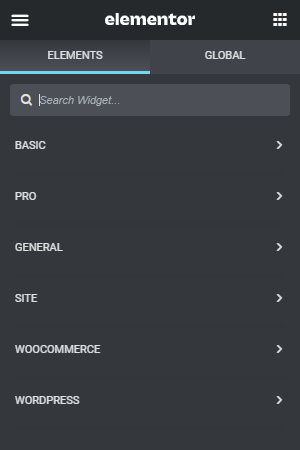
Elementor widget categories are used to organize the widgets into groups. When Elementor is initialized, it registers several default categories.
Categories are only displayed in the widgets panel if they have widgets assigned to them.
External developers can create new categories and display their widgets separately, in branded categories.
Using Widget Categories
We use widget categories when registering new Elementor widgets. By extending the \Elementor\Widget_Base class, we are inheriting the \Elementor\Widget_Base::get_categories() method which returns the general category by default.
To assign the widget to a different category, we need to override this method and return our new category the following way:
php
class Elementor_Test_Widget extends \Elementor\Widget_Base {

	public function get_categories(): array {
		return [ 'basic' ];
	}

}Default Categories
When you select which category to assign your widget to, you can select one of the default categories:
| Label | Name | Package | Description |
|---|---|---|---|
| Basic | basic | Elementor | Category for basic widgets |
| Pro | pro-elements | ElementorPro | Category for advanced widgets |
| General | general | Elementor | Category for general widgets |
| Site | theme-elements | ElementorPro | Category for site & theme widgets |
| WooCommerce | woocommerce-elements | ElementorPro | Category for WooCommerce widgets |
| {Custom} | Custom categories added by external developers | ||
| WordPress | wordpress | WordPress | Category for WordPress widgets |
Or you can register your own category.
Creating New Categories
Elementor allows developers to add new widget categories in which to group their own custom widgets. Registering a new widget category is done using the elementor/elements/categories_registered action.
Note: When creating a new category, you need to supply the category name/slug, category title/label and the category icon.
php
function add_elementor_widget_categories( $elements_manager ) {

	$elements_manager->add_category(
		'first-category',
		[
			'title' => esc_html__( 'First Category', 'textdomain' ),
			'icon' => 'fa fa-plug',
		]
	);
	$elements_manager->add_category(
		'second-category',
		[
			'title' => esc_html__( 'Second Category', 'textdomain' ),
			'icon' => 'fa fa-plug',
		]
	);

}
add_action( 'elementor/elements/categories_registered', 'add_elementor_widget_categories' );