
Appearance
Image Dimensions Control
Elementor Core Basic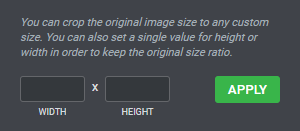
Elementor image dimensions control displays a width input, a height input and an apply button. It is used by the Image Size group control to allow the user to set custom width or height for an image.
The control is defined in Control_Image_Dimensions class which extends Control_Base_Multiple class.
When using this control, the type should be set to \Elementor\Controls_Manager::IMAGE_DIMENSIONS constant.
Arguments
| Name | Type | Default | Description |
|---|---|---|---|
type | string | image_dimensions | The type of the control. |
label | string | The label that appears above of the field. | |
description | string | The description that appears below the field. | |
show_label | bool | false | Whether to display the label. |
label_block | bool | true | Whether to display the label in a separate line. |
separator | string | default | Set the position of the control separator. Available values are default, before and after. default will hide the separator, unless the control type has specific separator settings. before / after will position the separator before/after the control. |
default | array | Default image dimension values.
|
Return Value
[
	'width' => '',
	'height' => '',
](array) An array containing image dimension values:
- $width (
int) Image width. - $height (
int) Image height.
Usage
php
<?php
class Elementor_Test_Widget extends \Elementor\Widget_Base {

	protected function register_controls(): void {

		$this->start_controls_section(
			'content_section',
			[
				'label' => esc_html__( 'Content', 'textdomain' ),
				'tab' => \Elementor\Controls_Manager::TAB_CONTENT,
			]
		);

		$this->add_control(
			'custom_dimension',
			[
				'label' => esc_html__( 'Image Dimension', 'textdomain' ),
				'type' => \Elementor\Controls_Manager::IMAGE_DIMENSIONS,
				'description' => esc_html__( 'Crop the original image size to any custom size. Set custom width or height to keep the original size ratio.', 'textdomain' ),
				'default' => [
					'width' => '',
					'height' => '',
				],
			]
		);

		$this->end_controls_section();

	}

}