
Appearance
URL Control
Elementor Core Basic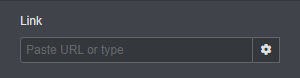
Elementor URL control displays a URL input field. The control also has the ability to display more controls, such as the ability to open the link in new window, to add nofollow attribute and to define additional attributes (a comma-separated list of key-value pairs).
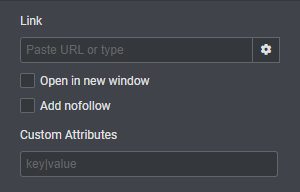
The control is defined in Control_URL class which extends Control_Base_Multiple class.
When using this control, the type should be set to \Elementor\Controls_Manager::URL constant.
Arguments
| Name | Type | Default | Description |
|---|---|---|---|
type | string | url | The type of the control. |
label | string | The label that appears above of the field. | |
description | string | The description that appears below the field. | |
show_label | bool | true | Whether to display the label. |
label_block | bool | true | Whether to display the label in a separate line. |
separator | string | default | Set the position of the control separator. Available values are default, before and after. default will hide the separator, unless the control type has specific separator settings. before / after will position the separator before/after the control. |
placeholder | string | Paste URL or type | The field placeholder that appears when the field has no values. |
autocomplete | bool | true | Whether to allow search functionality. |
options | array|false | [ 'url', 'is_external', 'nofollow', 'custom_attributes' ] | An array of URL options to show. By default it shows all the options. But you can select which URL elements to show. Setting the options to false we disable all the options. |
default | array | The field default values.
|
Return Value
[
	'url' => 'https://your-link.com',
	'is_external' => true,
	'nofollow' => true,
	'custom_attributes' => '',
](array) An array containing the link data:
- $url (
string) The URL. - $is_external (
bool) Whether to open the url in the same tab or in a new one. - $nofollow (
bool) Whether to add nofollow attribute. - $custom_attributes (
string) Custom attributes string that come as a string of comma-delimitedkey|valuepairs.
Usage
php
<?php
class Elementor_Test_Widget extends \Elementor\Widget_Base {

	protected function register_controls(): void {

		$this->start_controls_section(
			'content_section',
			[
				'label' => esc_html__( 'Content', 'textdomain' ),
				'tab' => \Elementor\Controls_Manager::TAB_CONTENT,
			]
		);

		$this->add_control(
			'website_link',
			[
				'label' => esc_html__( 'Link', 'textdomain' ),
				'type' => \Elementor\Controls_Manager::URL,
				'options' => [ 'url', 'is_external', 'nofollow' ],
				'default' => [
					'url' => '',
					'is_external' => true,
					'nofollow' => true,
					// 'custom_attributes' => '',
				],
				'label_block' => true,
			]
		);

		$this->end_controls_section();

	}

	protected function render(): void {
		$settings = $this->get_settings_for_display();
		if ( ! empty( $settings['website_link']['url'] ) ) {
			$this->add_link_attributes( 'website_link', $settings['website_link'] );
		}
		?>
		<a <?php $this->print_render_attribute_string( 'website_link' ); ?>>
			...
		</a>
		<?php
	}

	protected function content_template(): void {
		?>
		<a href="{{ settings.website_link.url }}">
			...
		</a>
		<?php
	}

}