
Appearance
Repeater Control
Elementor Core Advanced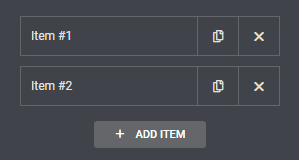
Elementor repeater control allows you to build repeatable blocks of fields. You can create, for example, a set of fields that will contain a title and a WYSIWYG text – the user will then be able to add "rows", and each row will contain a title and a text. The data can be wrapped in custom HTML tags, designed using CSS, and interact using JS or external libraries.
The control is defined in Control_Repeater class which extends Base_Data_Control class.
When using this control, the type should be set to \Elementor\Controls_Manager::REPEATER constant.
Arguments
| Name | Type | Default | Description |
|---|---|---|---|
type | string | repeater | The type of the control. |
label | string | The label that appears above of the field. | |
description | string | The description that appears below the field. | |
show_label | bool | true | Whether to display the label. |
label_block | bool | false | Whether to display the label in a separate line. |
separator | string | default | Set the position of the control separator. Available values are default, before and after. default will hide the separator, unless the control type has specific separator settings. before / after will position the separator before/after the control. |
fields | array | A multi dimensional array containing the repeater fields. | |
title_field | string | Field that will be used as the repeater title in the fields list when the item is minimized. | |
prevent_empty | bool | true | Whether to prevent deleting the first repeater field. To keep at least one repeater field. |
default | array | Default repeater values. A multi dimensional array containing fields as keys and default values for each key as values: [ [ 'title' => '', 'content' => '' ], [ 'title' => '', 'content' => '' ], ... ] |
Return Value
(array) A multi dimensional array containing inner fields values.
Usage
Usage example with fields array:
php
<?php
class Elementor_Test_Widget extends \Elementor\Widget_Base {

	protected function register_controls(): void {

		$this->start_controls_section(
			'content_section',
			[
				'label' => esc_html__( 'Content', 'textdomain' ),
				'tab' => \Elementor\Controls_Manager::TAB_CONTENT,
			]
		);

		$this->add_control(
			'list',
			[
				'label' => esc_html__( 'Repeater List', 'textdomain' ),
				'type' => \Elementor\Controls_Manager::REPEATER,
				'fields' => [
					[
						'name' => 'list_title',
						'label' => esc_html__( 'Title', 'textdomain' ),
						'type' => \Elementor\Controls_Manager::TEXT,
						'default' => esc_html__( 'List Title' , 'textdomain' ),
						'label_block' => true,
					],
					[
						'name' => 'list_content',
						'label' => esc_html__( 'Content', 'textdomain' ),
						'type' => \Elementor\Controls_Manager::WYSIWYG,
						'default' => esc_html__( 'List Content' , 'textdomain' ),
						'show_label' => false,
					],
					[
						'name' => 'list_color',
						'label' => esc_html__( 'Color', 'textdomain' ),
						'type' => \Elementor\Controls_Manager::COLOR,
						'selectors' => [
							'{{WRAPPER}} {{CURRENT_ITEM}}' => 'color: {{VALUE}}'
						],
					]
				],
				'default' => [
					[
						'list_title' => esc_html__( 'Title #1', 'textdomain' ),
						'list_content' => esc_html__( 'Item content. Click the edit button to change this text.', 'textdomain' ),
					],
					[
						'list_title' => esc_html__( 'Title #2', 'textdomain' ),
						'list_content' => esc_html__( 'Item content. Click the edit button to change this text.', 'textdomain' ),
					],
				],
				'title_field' => '{{{ list_title }}}',
			]
		);

		$this->end_controls_section();

	}

	protected function render(): void {
		$settings = $this->get_settings_for_display();

		if ( $settings['list'] ) {
			echo '<dl>';
			foreach (  $settings['list'] as $item ) {
				echo '<dt class="elementor-repeater-item-' . esc_attr( $item['_id'] ) . '">' . $item['list_title'] . '</dt>';
				echo '<dd>' . $item['list_content'] . '</dd>';
			}
			echo '</dl>';
		}
	}

	protected function content_template(): void {
		?>
		<# if ( settings.list.length ) { #>
			<dl>
			<# _.each( settings.list, function( item ) { #>
				<dt class="elementor-repeater-item-{{ item._id }}">{{{ item.list_title }}}</dt>
				<dd>{{{ item.list_content }}}</dd>
			<# }); #>
			</dl>
		<# } #>
		<?php
	}

}Usage example with Repeater() class:
php
<?php
class Elementor_Test_Widget extends \Elementor\Widget_Base {
protected function register_controls(): void {
$this->start_controls_section(
'content_section',
[
'label' => esc_html__( 'Content', 'textdomain' ),
'tab' => \Elementor\Controls_Manager::TAB_CONTENT,
]
);
$repeater = new \Elementor\Repeater();
Notes
Repeaters can be conditionally displayed. However, it's important to understand exactly what you can and cannot do when conditionally displaying repeater fields.