
Appearance
Notice Control
Elementor Core Basic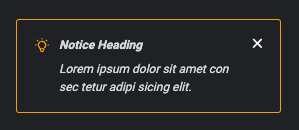
Elementor notice control displays a four types of notices in the panel based on the severity of the message: info, success, warning and danger.
Unlike the alert control, the notice control has the option to make it dismissible, allowing the user to close the message and never show it again.
The control is defined in Control_Notice class which extends Base_UI_Control class.
When using this control, the type should be set to \Elementor\Controls_Manager::NOTICE constant.
Arguments
| Name | Type | Default | Description |
|---|---|---|---|
type | string | notice | The type of the control. |
separator | string | default | Set the position of the control separator. Available values are default, before and after. default will hide the separator, unless the control type has specific separator settings. before / after will position the separator before/after the control. |
notice_type | string | info | The type of the notice. Available values are info, success, warning and danger. |
dismissible | bool | false | Allow the user to dismiss the notice. |
heading | string | The heading that appears above of the notice. | |
content | string | The content of the notice. |
Return Value
This control does not return any value.
Usage
php
<?php
class Elementor_Test_Widget extends \Elementor\Widget_Base {

	protected function register_controls(): void {

		$this->start_controls_section(
			'content_section',
			[
				'label' => esc_html__( 'Content', 'textdomain' ),
				'tab' => \Elementor\Controls_Manager::TAB_CONTENT,
			]
		);

		$this->add_control(
			'custom_panel_notice',
			[
				'type' => \Elementor\Controls_Manager::NOTICE,
				'notice_type' => 'warning',
				'dismissible' => true,
				'heading' => esc_html__( 'Custom Notice', 'textdomain' ),
				'content' => esc_html__( 'Lorem ipsum dolor sit amet consectetur adipisicing elit.', 'textdomain' ),
			]
		);

		$this->end_controls_section();

	}

}