
Appearance
Select2 Control
Elementor Core Basic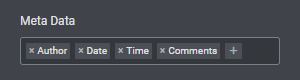
Elementor select2 control displays a select box control based on Select2 library. It accepts an array in which the key is the value and the value is the option name. Set multiple to true to allow multiple value selection.
The control is defined in Control_Select2 class which extends Base_Data_Control class.
When using this control, the type should be set to \Elementor\Controls_Manager::SELECT2 constant.
Arguments
| Name | Type | Default | Description |
|---|---|---|---|
type | string | select2 | The type of the control. |
label | string | The label that appears above of the field. | |
description | string | The description that appears below the field. | |
show_label | bool | true | Whether to display the label. |
label_block | bool | false | Whether to display the label in a separate line. |
separator | string | default | Set the position of the control separator. Available values are default, before and after. default will hide the separator, unless the control type has specific separator settings. before / after will position the separator before/after the control. |
options | array | An array of key => value pairs: [ 'key' => 'value', ... ] | |
multiple | bool | false | Whether to allow multiple value selection. |
default | string|array | The selected option key, or an array of selected values if multiple is set to true. |
Return Value
(string|array) The selected option key, or an array of selected keys if multiple is set to true.
Usage
php
<?php
class Elementor_Test_Widget extends \Elementor\Widget_Base {

	protected function register_controls(): void {

		$this->start_controls_section(
			'content_section',
			[
				'label' => esc_html__( 'Content', 'textdomain' ),
				'tab' => \Elementor\Controls_Manager::TAB_CONTENT,
			]
		);

		$this->add_control(
			'list',
			[
				'label' => esc_html__( 'Show Elements', 'textdomain' ),
				'type' => \Elementor\Controls_Manager::SELECT2,
				'label_block' => true,
				'multiple' => true,
				'options' => [
					'title'  => esc_html__( 'Title', 'textdomain' ),
					'description' => esc_html__( 'Description', 'textdomain' ),
					'button' => esc_html__( 'Button', 'textdomain' ),
				],
				'default' => [ 'title', 'description' ],
			]
		);

		$this->end_controls_section();

	}

	protected function render(): void {
		$settings = $this->get_settings_for_display();
		if ( $settings['list'] ) {
			echo '<ul>';
			foreach ( $settings['list'] as $item ) {
				echo '<li>' . $item . '</li>';
			}
			echo '</ul>';
		}
	}

	protected function content_template(): void {
		?>
		<# if ( settings.list.length ) { #>
			<ul>
			<# _.each( settings.list, function( item ) { #>
				<li>{{{ item }}}</li>
			<# } ) #>
			</ul>
		<# } #>
		<?php
	}

}